Bug alerts in Slack without the noise
Connecting a bug tracker to Slack takes about thirty seconds. Deciding what should actually come through is the part that determines whether the channel is still being read a month later.
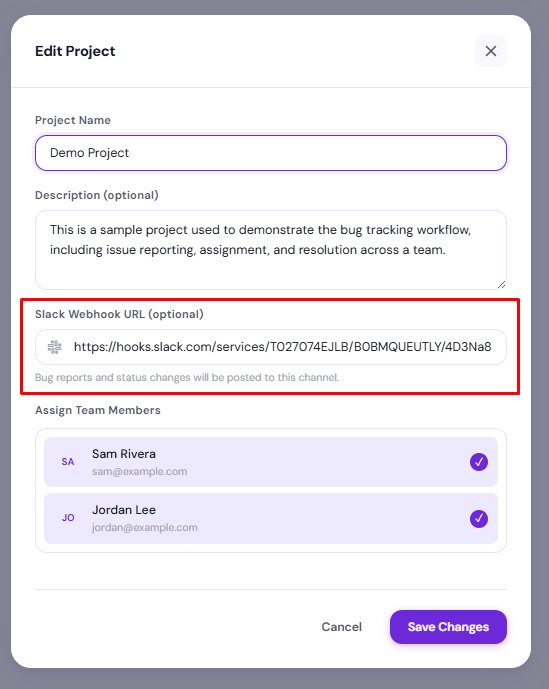
Send two events to Slack: a bug being filed, and a bug changing status. Everything else — comments, edits, reassignments — belongs in the tracker and in email. Use a webhook per project so each channel only sees work its people care about. A channel that is mostly noise gets muted, and then the urgent message is missed too.
The failure mode is predictable
Almost every team that wires a tracker into Slack does it the same way: turn on all the events, because you can, and see how it goes. It goes like this. Day one, people comment on the bot messages. Day four, someone says "can we move this to its own channel". Day nine, the channel is muted by everyone except the person who set it up, who stops looking at it a week later.
The cause isn't volume exactly — it's the ratio. A channel where nine messages in ten require no action from anyone reading trains people to ignore it. After that, the integration is worse than not having one, because there is now a place urgent things go to be unread.
A notification is a request for someone's attention. If most of your notifications don't deserve it, people correctly stop giving it to any of them.
What earns a message, and what doesn't
| Event | Slack? | Reasoning |
|---|---|---|
| New bug filed | Yes | Someone may need to react before triage; this is the one that matters |
| Status changed | Yes | Tells whoever was waiting that they can stop waiting, or start testing |
| New comment | No | Conversation belongs on the bug; email the people involved instead |
| Assignee changed | No | Matters to exactly one person — notify them directly |
| Priority or field edited | No | Pure bookkeeping, visible in the activity timeline |
| Bug closed | Covered | It is a status change; no separate event needed |
The test for each row is the same: if this message appears while nobody is looking at the tracker, does anyone need to do something differently? For a filed bug and a status change, sometimes yes. For a field edit, never.
One webhook per project, not one for everything
The second thing that kills these channels is mixing audiences. If the client work, the
internal tool and the side project all post into #bugs, then everybody
filters mentally on every message, and mental filtering is exactly the habit that turns
into muting.
Per-project webhooks fix this without any cleverness. The team working on a client project gets that project's bugs in the channel they already sit in. Nobody else sees them. This is why BugTrack stores the webhook URL per project rather than globally — one field, set by whoever runs that project.
Setting it up
For one-way notifications you need an incoming webhook, not a full Slack app. The distinction matters: a webhook is a URL you paste into a settings field, while an app means an OAuth install, permission scopes and something to maintain. You only need the app if you want to change bug state from inside Slack — a workflow that sounds useful and, in small teams, is almost never used, because the person acting on the bug is about to open the tracker anyway.
- In Slack, create an incoming webhook and choose the channel it posts to.
- Copy the webhook URL. It is a secret — anyone holding it can post to that channel.
- Paste it into the project's settings in your tracker.
- File a test bug and confirm it lands in the right channel.
Step four is worth doing properly rather than assuming. The common mistake is pasting a webhook for the wrong channel and discovering it three weeks later when a client bug appears in an internal thread.
What good looks like in the message itself
A useful alert answers "do I care?" without anyone clicking through. That means the title, the priority and who reported it — and a link for the people who do care. What it should not contain is the full description: Slack renders it badly, it pushes other messages off screen, and it removes the reason to open the bug where the context actually lives.
Email still does the other half
Dropping comments and assignments from Slack only works if they go somewhere. That somewhere is email, aimed at the individuals involved rather than broadcast to a room. The split is straightforward:
- Slack — things a group might need to react to: new bugs, status changes.
- Email — things one person needs to know: you were assigned this, someone replied to you, someone mentioned you.
- The tracker — everything, permanently, whether or not anyone was notified.
Frequently asked questions
Which bug events are worth sending to Slack?
New bugs and status changes. Those are the two moments where someone outside the tracker might need to act or stop waiting.
Do I need a Slack app, or is a webhook enough?
A webhook is enough for notifications and takes about thirty seconds. Only reach for an app if you genuinely intend to act on bugs from inside Slack.
Should the client be in the Slack channel?
Usually not. Give them read-only access to the project instead — a channel of raw bug alerts reads very differently to someone paying for the work.
Per-project Slack alerts, included
BugTrack posts new bugs and status changes to a Slack channel per project via an incoming webhook. Free, self-hosted, about thirty seconds to set up.
See the features →