Jira bug tracking vs BugTrack: which fits a small team?
Jira is built for organizations with a product owner, a QA function, and a release manager. Most teams reading this have none of those roles yet. Here is an honest comparison — including where Jira is genuinely the better tool.
Choose Jira if you already coordinate several teams, need a configurable workflow builder, or live in the Atlassian ecosystem. Choose BugTrack if you are one to twenty people who just need bugs filed, assigned, and tracked to closed — without per-seat pricing or a configuration project first.
Side by side
| Jira | BugTrack | |
|---|---|---|
| Pricing model | Per seat, tiered by user count | Free, unlimited seats |
| Hosting | Cloud (or Data Center, enterprise-priced) | Self-hosted on your own server, by default |
| Setup time | Hours to days of workflow/project configuration | Minutes — download, install, done |
| Scope | Full project management: epics, sprints, boards, workflows | Focused bug tracking: statuses, priority, comments |
| Client / viewer access | Possible, but priced as another seat | Free read-only viewer role per project |
| Database | Managed by Atlassian (cloud) or a separate DB server (Data Center) | SQLite file, no separate server |
| Learning curve | Real — most teams need a Jira admin | File your first bug within a minute |
Where Jira genuinely wins
This isn't a "Jira is bad" page. If you're coordinating several teams against a shared roadmap, need a workflow builder that enforces who can move an issue where, or already depend on Confluence and the rest of the Atlassian suite, Jira's depth is the point — not a downside. The marketplace of plugins covers integrations that a focused tool like BugTrack will never build.
Jira also scales in a way small self-hosted tools generally don't try to: thousands of issues, dozens of projects, complex permission schemes. If that's the shape of your organization, the per-seat cost is buying real capability.
Where BugTrack fits better
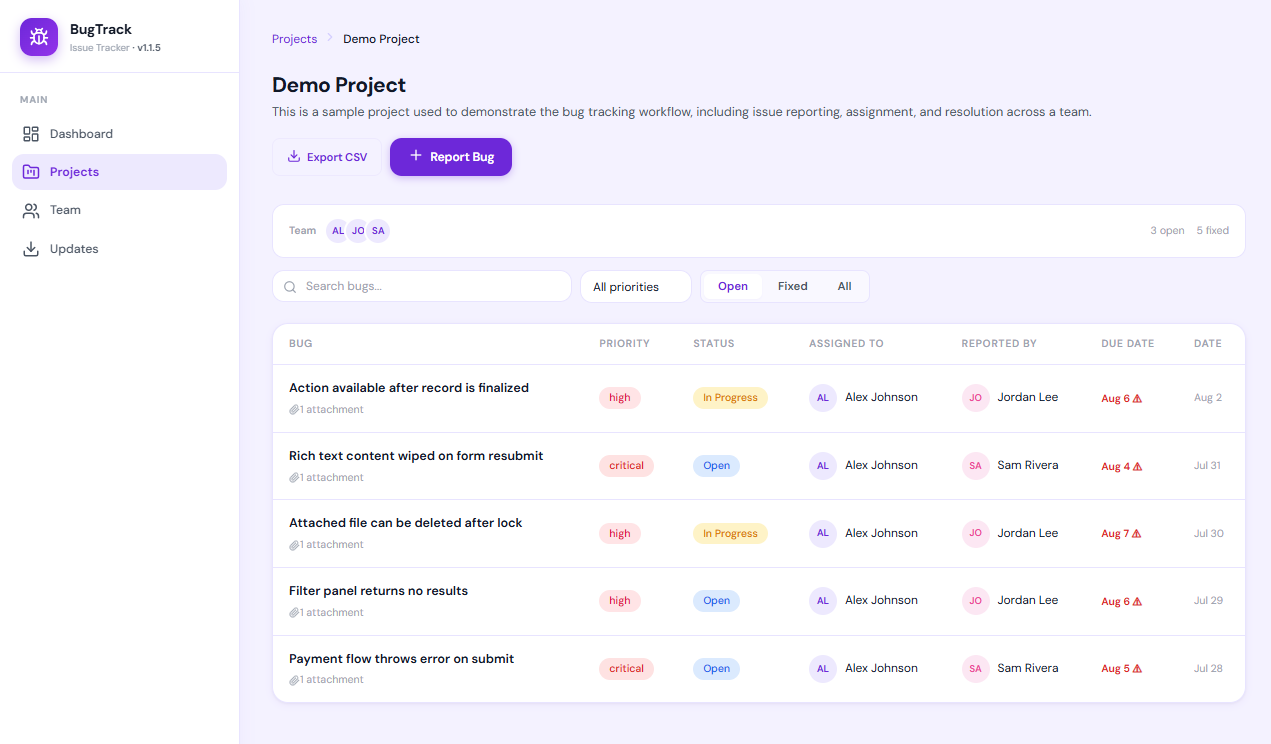
Below about twenty people, the roles Jira assumes — a product owner scoping epics, a release manager gatekeeping sprints — usually don't exist yet. What's left is a team that wants one place bugs go, and a tool that doesn't need a dedicated admin to keep running.
- No per-seat pricing. Adding a fifth developer, a designer, or a client doesn't change your bill, because there isn't one.
- Nothing to configure first. Four statuses, one priority field, and per-project roles are already set up when you install it.
- Your data stays on your server. A local SQLite database rather than a cloud account you don't control.
- A safe role for non-developers. The viewer role lets a client or stakeholder see status without touching anything.
Being the wrong tool for a two-hundred-person company is what makes a tool right for a team of five. Jira isn't wrong — it's aimed further up the size curve than most small teams currently are.
Moving off Jira
If you're evaluating a move, export your open issues to CSV first (Jira supports this natively) and re-file the ones still relevant — most teams find the backlog is a good moment to close out issues nobody was ever going to fix. BugTrack's CSV export makes the reverse move just as easy if you ever need it.
Frequently asked questions
Is there a free alternative to Jira?
Yes. BugTrack is free to download and self-host, with no per-seat pricing and no free-tier user cap. It covers bug tracking specifically rather than Jira's broader project-management scope.
Can I self-host instead of using Jira Cloud?
Jira offers Data Center for self-hosting, but it's priced and operated for large organizations. BugTrack is self-hosted by default, runs on a single small server with SQLite, and has no separate licensing tier for that.
What does Jira do better than BugTrack?
Scale and ecosystem. Jira handles thousands of issues across dozens of teams, has a large marketplace of plugins, and integrates with the rest of the Atlassian suite. BugTrack doesn't attempt any of that — it stays focused on bug tracking for a small team.
See it before you decide
BugTrack is free, self-hosted, and running in about 15 minutes. No account, no card, no per-seat pricing.
Download free →